
Contents
Register For Vipgames Easily With Facebook, Google, Email
Register for Vipgames helps players easily create a new account to participate in and use the features available on the platform. With just a few simple registration steps, you can complete your personal information, set up your own account, and get ready to explore the various entertainment content offered by Vipgames.
Conditions for becoming a Vipgames member
To become a Vipgames member, players need to meet several basic requirements when creating and using an account on the platform. The register for Vipgames conditions help ensure that the account is properly registered and can access the available features.
- Meet the required age: Players need to meet the age requirements for participation according to Vipgames’ terms and conditions before registering an account.
- Provide accurate registration information: Information such as Email, linked accounts, or verification data needs to be entered completely so that the system can verify the information and create the account.
- Own a valid account: Each player needs to use their own registered account and must not use fake information or another person’s account to participate.
- Agree to the terms of use: Players need to read and accept Vipgames’ regulations before completing the membership registration process.
3 easiest ways to register for Vipgames
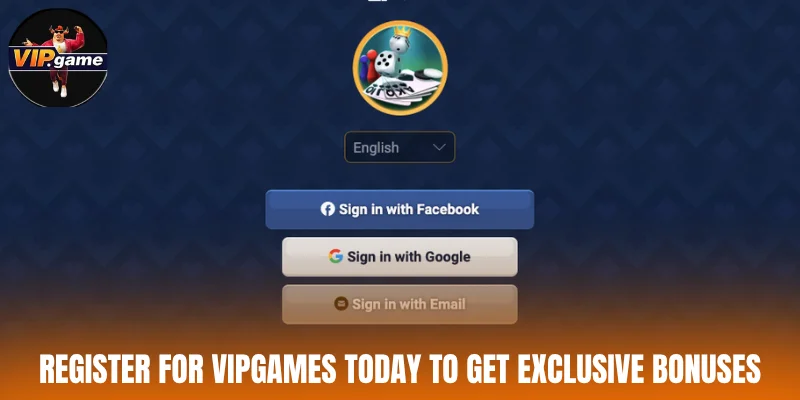
Register is simple through Facebook, Google, or Email. Players only need to provide the necessary information and verify their account to complete the registration. These methods make account creation quick, convenient, and easy while providing access to the entertainment features available on the platform.
How to register quickly through Facebook
Registering for Vipgames with Facebook helps players save time because they do not need to enter too much personal information manually. With just a few steps to link the account, you can quickly complete the process of creating a new account.
- Step 1: Access the Vipgames application or homepage, then select the Sign in with Facebook button to begin the registration process.
- Step 2: When the Facebook account linking window appears, click Continue as [Your Facebook Name] to confirm access permission.
- Step 3: Wait for the system to synchronize information from Facebook and complete the creation of your Vipgames account. After that, you can log in and use the features available on the platform.
Guide to register for Vipgames through Google
Using Google to register for Vipgames helps players shorten the account creation process without having to manually enter a large amount of information. Simply select your Gmail account and confirm the connection to complete the registration easily.
- Step 1: Open the Vipgames application or website and select Sign in with Google to begin the registration process.
- Step 2: In the Google account selection window, click the Gmail address you want to link with Vipgames.
- Step 3: Confirm by selecting Continue or Allow to grant connection permission. The system will automatically process the request and create a new Vipgames account for you.
Account creation process using Email
Register for Vipgames by Email is a direct account creation method suitable for players who want to use their own information to manage their account. The process is relatively simple and only requires you to enter an Email address, create a password, and confirm the registration.
- Step 1: On the main Vipgames interface, select Sign in with Email to begin creating an account.
- Step 2: Enter the Email address you want to use in the E-mail field, then click Continue to move to the next step.
- Step 3: In the Create an account here section, enter your password in the Password field, confirm it in the Repeat password field, and then select Create Account to complete the registration.
Notes when register for Vipgames
Players need to pay attention to the information provided during the account creation process to ensure that registration is completed successfully on the first attempt. Following the notes below can help ensure that the account is set up properly and minimize unwanted errors, whether you are using the website or download the Vipgamesapp.

Use an accurate Email or linked account
When you register Vipgames using Email, Facebook, or Google, players need to select the correct account they want to use to create their profile. The linked information should belong to the person registering so that it is convenient to verify and use the account later. Avoid using an inactive Email address or another person’s account for registration.
Check the information before completing registration
Before clicking the register for Vipgames button, players should check the information they have entered, including their Email, password, and linking method. Small errors at this stage may prevent registration from being completed or affect the subsequent account usage process. Provide complete and accurate details in all required sections.
How to handle errors when register for Vipgames?
During the register Vipgames process, players may encounter some errors related to registration information or account verification. Identifying the correct cause will help you resolve the issue quickly and complete the account creation process.

Review your registration details carefully
One of the most common errors when register for Vipgames is entering incorrect or incomplete information in the required fields. Players should check their Email, linked account, password, and other information entered before submitting the registration. If you find any inaccurate information, correct it and repeat the account creation process.
Try registering again after a system error
In some cases, registration errors may occur because the system is processing a request or experiencing a temporary issue. Players can exit the current interface and then repeat the register for Vipgames steps from the beginning. In addition, check whether the account has already been created successfully before registering again to avoid creating multiple duplicate accounts.
Contact the operator’s support team for assistance
If you have checked your information and tried registering again but still cannot complete the process, you should contact the support department. Providing relevant information such as the registration method, displayed error, or time when the issue occurred can help the support team respond more quickly. The operator’s support staff can check the account status and provide appropriate instructions for resolving the issue.
Conclusion
With simple registration methods such as Facebook, Google, or Email, register for Vipgames becomes easy and does not require too much time. By completing the required information and following the relevant registration notes, players can use their operator account more conveniently.